
What is the Company Printout?
The Company Printout is the official registry extract issued by the Companies Registration Office (CRO) in Ireland (An Oifig um Chlárú Cuideachtaí). It provides a comprehensive snapshot of a company's current registration status, and it covers the company's identity, its officers, its registered charges, and the complete filing history of documents submitted to the CRO.
Because it is the primary document for verifying a company's legal existence and standing in Ireland, the Company Printout is widely used in KYB (Know Your Business) due diligence, AML checks, and corporate onboarding processes. The document is available for all entity types registered with the CRO, including Private Companies Limited by Shares (LTD) and Designated Activity Companies (DAC), and it can be obtained directly from the CRO's online portal or through authorised search providers.
What does it contain?
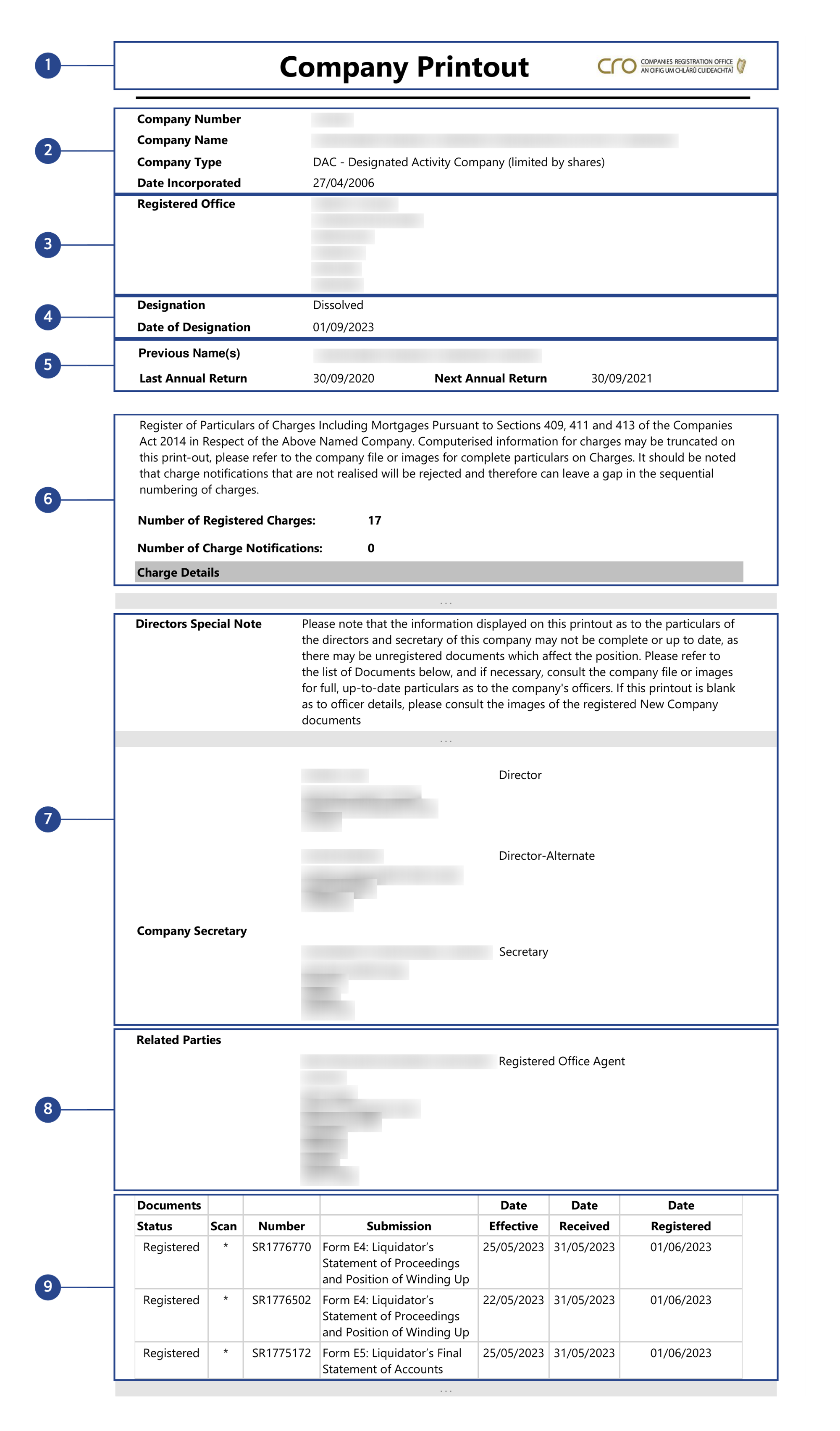
1. Document header and issuing authority
The printout opens with the title "Company Printout" accompanied by the CRO logo and branding. Each page also displays a footer with the date of extraction, the company number, the company name, and a page count, so you always know when the document was generated.
2. Company identification
The top section provides the core identifiers for the entity:
| Field | Description |
|---|---|
Company Number | Unique CRO registration number |
Company Name | Official registered name |
Company Type | Legal form (e.g., LTD, DAC) |
Date Incorporated | Date the company was registered |
The Company Type field uses standardised abbreviations together with a full description: for example, "LTD - Private Company Limited by Shares" or "DAC - Designated Activity Company (limited by shares)".
3. Registered office address
The full registered office address is displayed, including the Eircode (Irish postal code) where available, because this is the official address for service of legal documents on the company.
4. Company status and designation
This section indicates the company's current standing:
- Designation: the company's status, such as "Dissolved" or, for active companies, "Normal"
- Date of Designation: the date the current status took effect
For compliance purposes, a "Dissolved" designation is a critical flag, because it means the entity is no longer legally active.
5. Previous names and annual return dates
- Previous Name(s): any former names under which the company was registered, which is important for tracing entity history
- Last Annual Return: the date of the most recently filed annual return
- Next Annual Return: the expected date for the next filing
A significant gap between the last annual return and the expected next return can also indicate non-compliance with filing obligations.
6. Register of charges
The printout includes a dedicated section for charges registered against the company pursuant to Sections 409, 411, and 413 of the Companies Act 2014. This section opens with a summary:
- Number of Registered Charges: the total count of charges on record
- Number of Charge Notifications: pending charge notifications
Where charges exist, each entry includes:
| Field | Description |
|---|---|
Charge Num | Unique identifier (e.g., CHG-419239-1) |
Charge Type Description | Nature of the charge |
Date Registered / Date Created | When the charge was registered and created |
Amount Secured | Description of the obligations secured |
Particulars of Property | Detail of the assets charged |
Person Entitled Details | The charge holder (creditor) |
Satisfactions | Status, date, and type of satisfaction |
Charge types observed in the examples include charges on book debts, floating charges on undertakings or property, financial collateral agreements, and guarantee debentures. And where a charge has been fully discharged, the Satisfactions sub-section shows a status of "Registered" with a Satisfaction Type of "Full". The printout also notes that computerised charge information may be truncated, and it advises consulting the original submission images for complete particulars.
7. Directors and officers
A Directors Special Note precedes the officer listing, cautioning that the information displayed may not be complete or up to date because there may be unregistered documents. For each director, the printout provides:
- Full name
- Role (e.g., Director, Director-Alternate)
- Residential address
The Company Secretary is listed separately with the entity or individual name, role, and address, and in the examples both individual persons and corporate secretarial firms appear in this role.
8. Related parties
Where applicable, the printout lists related parties such as the Registered Office Agent, meaning the firm appointed to maintain the company's registered office, together with its name and full address.
9. Document filing history
The final section contains a chronological list of all documents filed with the CRO for the company. Each entry includes:
| Field | Description |
|---|---|
Status | Registration status (e.g., Registered, Submitted) |
Number | Submission reference number |
Submission | Description of the form or document |
Date Effective / Received / Registered | Key dates in the filing lifecycle |
A Scan column marked with an asterisk (*) indicates that document images have been scanned and are available for inspection. Common filings include Form B1C (Annual Return), Form B10 (Change of Directors/Secretary), Form C1 (Charge Created), Form C6 (Satisfaction of Charge), and winding-up related forms (E1 through E6, G1). Documents with a status of "Submitted" rather than "Registered" have been received by the CRO, but they are not yet formally registered.
The document concludes with a legend explaining submission status codes (CERTP, CERTS, DATA, REC, RECOR, REG, RETAM, SCAN) and the statement "End of Particulars".
What is not included?
The Company Printout does not contain:
- Shareholder or membership information: details of current or past shareholders are not disclosed in the printout, because these appear in the Annual Return (Form B1C)
- Beneficial ownership data: UBO information is held in the separate Register of Beneficial Ownership (RBO)
- Share capital details: authorised and issued capital figures do not appear
- Financial statements: annual accounts are filed separately and must be consulted independently
- Directors' dates of birth or nationality: unlike the Annual Return (B1C), the Company Printout does not include these personal details for directors
With Topograph
Topograph provides real-time access to the Company Printout and its data via its direct integration with the CRO. Through the platform, you can:
- Retrieve the legal profile of any Irish-registered company, including company type, registration date, status, and registered office
- Access directors and company secretary details, extracted from the Company Printout and returned as structured data
- Download the Company Printout PDF itself as the official Irish trade register extract
- Browse the company's CRO filing list and order individual filed documents
- Integrate Irish company verification into your onboarding and remediation workflows
All data is normalised for immediate use in your compliance processes, so your due diligence on Irish counterparties stays efficient.
---
Related articles
🇮🇪 Business Registers in Ireland: Companies Registration Office (CRO), RBN & RBO
Ireland's Companies Registration Office (CRO) is the primary authority for company registration, annual returns, and financial statements. The Register of Business Names (RBN) covers sole traders and partnerships. The Register of Beneficial Ownership (RBO) is Ireland's UBO register, not accessible via the CRO API.
Read article